
Free
Explore the essentials for your next service.
₦0NGN / month
Start free- Up to 10 songs, lyrics & media
- 5 Bible versions
- 30-minute speech-to-scripture trial
- Free EW / ProPresenter import
Church presentation software that works inside OBS Studio. Show Bible verses, worship lyrics, media and lower thirds on your livestream, or send them straight to your projector or TV with Studio mode. No scenes to build, no window juggling.
Mac & Windows Set up in minutes Bible & lyrics work offline
VERSE AI FOR OBS
Verse AI listens to the sermon, finds the Bible references as they’re mentioned, and suggests the matching verses inside MakeChurchEazy. Your team can send a verse to the screen through OBS Studio without stopping to search manually.
MakeChurchEazy brings Verse AI and an OBS-centered church presentation workflow together at a more affordable price.
Verse AI requires an internet connection and available AI credits on your plan.
ONE APP FOR THE WHOLE SERVICE
From Bible search to Sunday service and livestream.
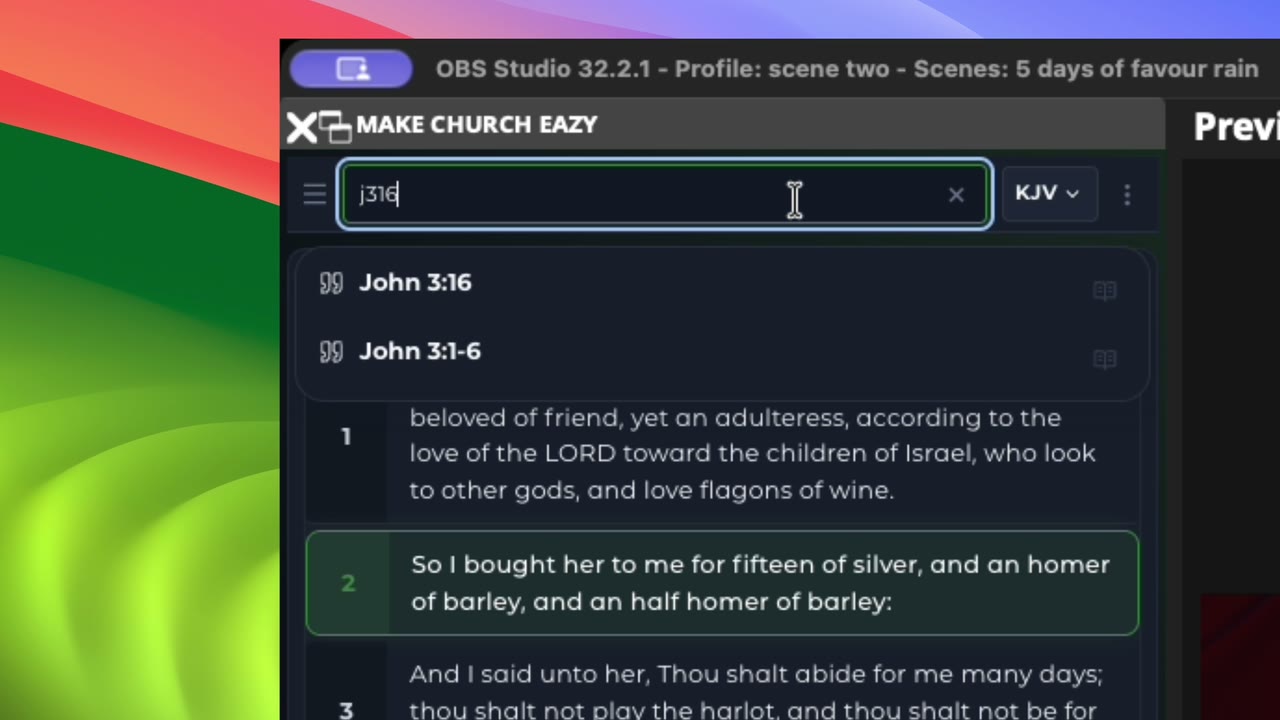
Search by reference or by any words in a verse, compare translations, and put scripture on your stream in one click.
Keep every song in one library and follow the worship team verse by verse, right from your OBS workspace.
Send scripture, lyrics and media straight to the projector or TV in the room. No OBS needed.
Go live everywhere at once. One click from OBS sends your service to every channel.
Show speaker names, sermon titles and scripture references that match your church colours and fonts.
Run announcements along the bottom of the stream and count down to the start of service.
No scenes or sources to create. MakeChurchEazy sets them up in OBS for you, and keeps them updated as your content changes (paid plans).
THE MAKECHURCHEAZY ADVANTAGE
Choose a Bible verse, worship lyric, media item, or lower third in MakeChurchEazy. It creates the matching OBS scene and source, then keeps your display in sync, so your team can focus on the service.
Comparing EasyWorship, ProPresenter, or Proclaim? MakeChurchEazy brings your church presentation and OBS controls together at a more affordable price.
Included with paid plans. Compare plans
Select a Bible verse, worship lyric, media item, or lower third.
MakeChurchEazy creates the matching scene and source for you.
Change the content in MakeChurchEazy and OBS updates in real time.
STUDIO MODE · NO OBS REQUIRED
Not every church streams. Studio mode sends scripture, worship lyrics and media straight to a projector or TV in the room, from the same app and the same library you use with OBS.
Open Studio mode from the dashboard. Feature availability varies by plan. Find your fit
Download and open Studio mode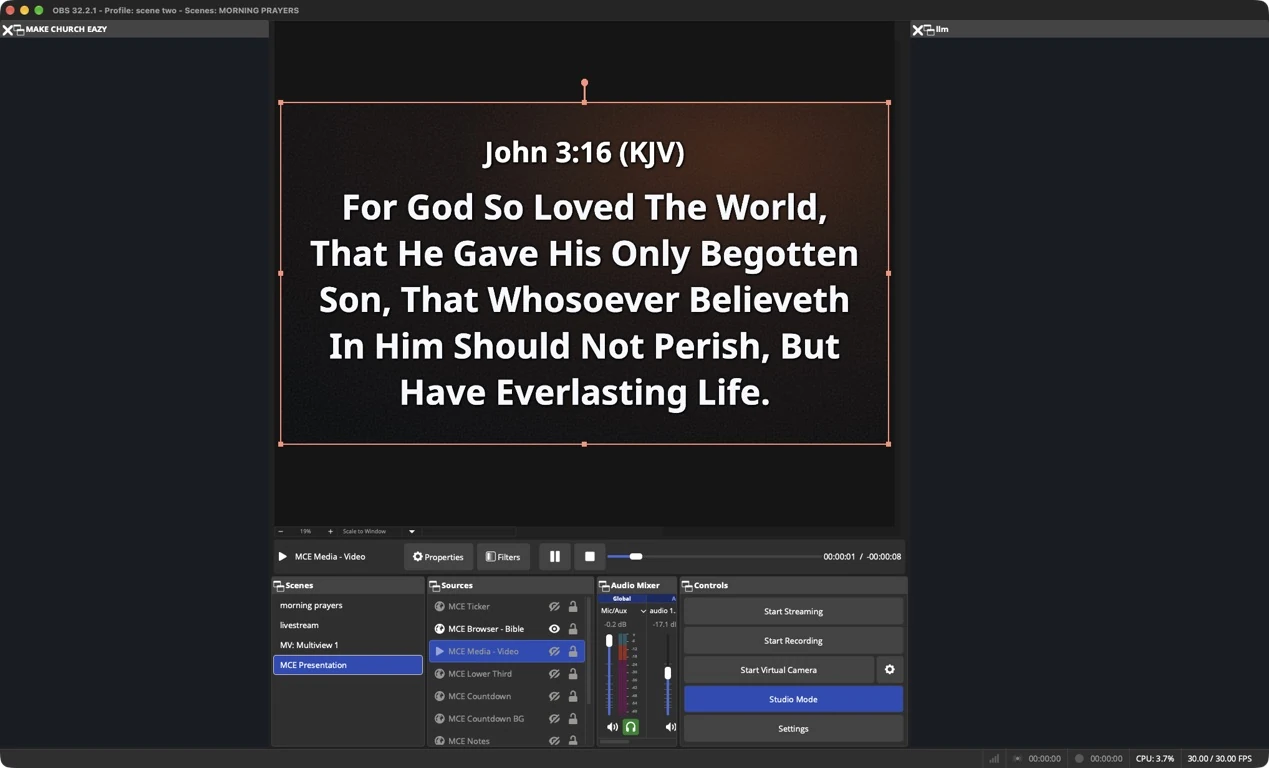
BUILT FOR OBS STUDIO
No second laptop. No panic alt-tabbing while the pastor is preaching. Your scriptures, lyrics, and media dock directly into OBS so your team controls the entire broadcast from a single window.
ROOM TO GROW
Explore the essentials for your next service.
A simpler setup for your weekly services.
Keep your operators and content connected.
Everything in Basic, plus:
One connected workflow across your campuses.
Everything in Growth, plus:
Bring your content with you. EasyWorship and ProPresenter import is free on every plan.
Install MakeChurchEazy and connect it to OBS Studio. Type a reference such as John 3:16 in the Bible dock and send it live, full screen or as a lower third. On paid plans MakeChurchEazy creates and updates the OBS scenes and sources for you. On the Free plan you add one presentation link to OBS as a Browser Source.
Yes. Studio mode sends scripture, worship lyrics and media straight to a projector, TV or second screen from the same app and library, with no OBS required.
Yes. MakeChurchEazy brings Bible reference search, verse comparison, and translation comparison into the OBS dock. Explore 1,000+ Bible versions in 250+ languages, compare passages side by side, and update displayed scripture in real time. Scripture can appear full screen or as a lower third.
On paid plans, MakeChurchEazy creates and manages the OBS scenes and sources for you. The Free plan uses a presentation link that you add once as an OBS Browser Source.
Yes. Keep your songs in one library, arrange lyric slides before the service, and show lyrics full screen or as a lower third. Speaker names and other lower thirds are sent from the same dock. Lower thirds are included on the Growth plan and above.
The Free plan costs $0 and includes up to 10 songs, lyrics and media, 5 Bible versions, a 30-minute speech-to-scripture trial, and free EasyWorship and ProPresenter import. Paid plans add unlimited content, all Bible versions and automatic OBS scenes and sources.
Yes. EasyWorship and ProPresenter import is free on every plan, so you can bring your existing song library with you.
Yes. Verse AI listens to the sermon through a microphone or OBS audio input and suggests a passage when it hears a spoken reference such as John chapter three, verse sixteen. Your operator reviews every suggestion before it goes on screen. Speech recognition needs an internet connection and depends on your plan and available credits.
Yes. MakeChurchEazy is available for Windows and macOS. The download page lets you choose the right installer for your computer.
The controls are built around the tasks your team already understands: show a Bible verse, display lyrics, introduce a speaker, or put media on screen. Tutorials help your team get comfortable with the workflow.
Yes. Start with the Free plan, then choose Basic, Growth, or Pro when you need more capacity and tools. Visit the plans page for current pricing and feature availability.
Many local presentation actions work after setup with downloaded content. Sign-in, downloads, cloud sync, billing, updates, and AI services require an internet connection.

LESS FRICTION. MORE FOCUS.
Bible. Worship. Media. Lower thirds. AI.
Built around OBS without the complicated setup.
Windows & macOS